

Case Investigation

Analyze your document and
investigate it in depth

On the Finovox platform, locate anomalies and trace changes to the document. Base your decision on concrete findings and share your conclusions in a PDF report.

Request a demo

Move from uncertainty
to a well-founded decision

Has a document been flagged as high risk? Investigate it in detail.

  • Focus your checks

    Access flagged areas and explanations to focus your review on suspicious elements in the document.

  • Support your decision

    Use the document’s history and the changes identified to explain why you confirm or dismiss the suspicion.

  • Share findings others can act on

    Share a PDF report that brings together your findings and conclusions. Give colleagues the information they need to continue the investigation.
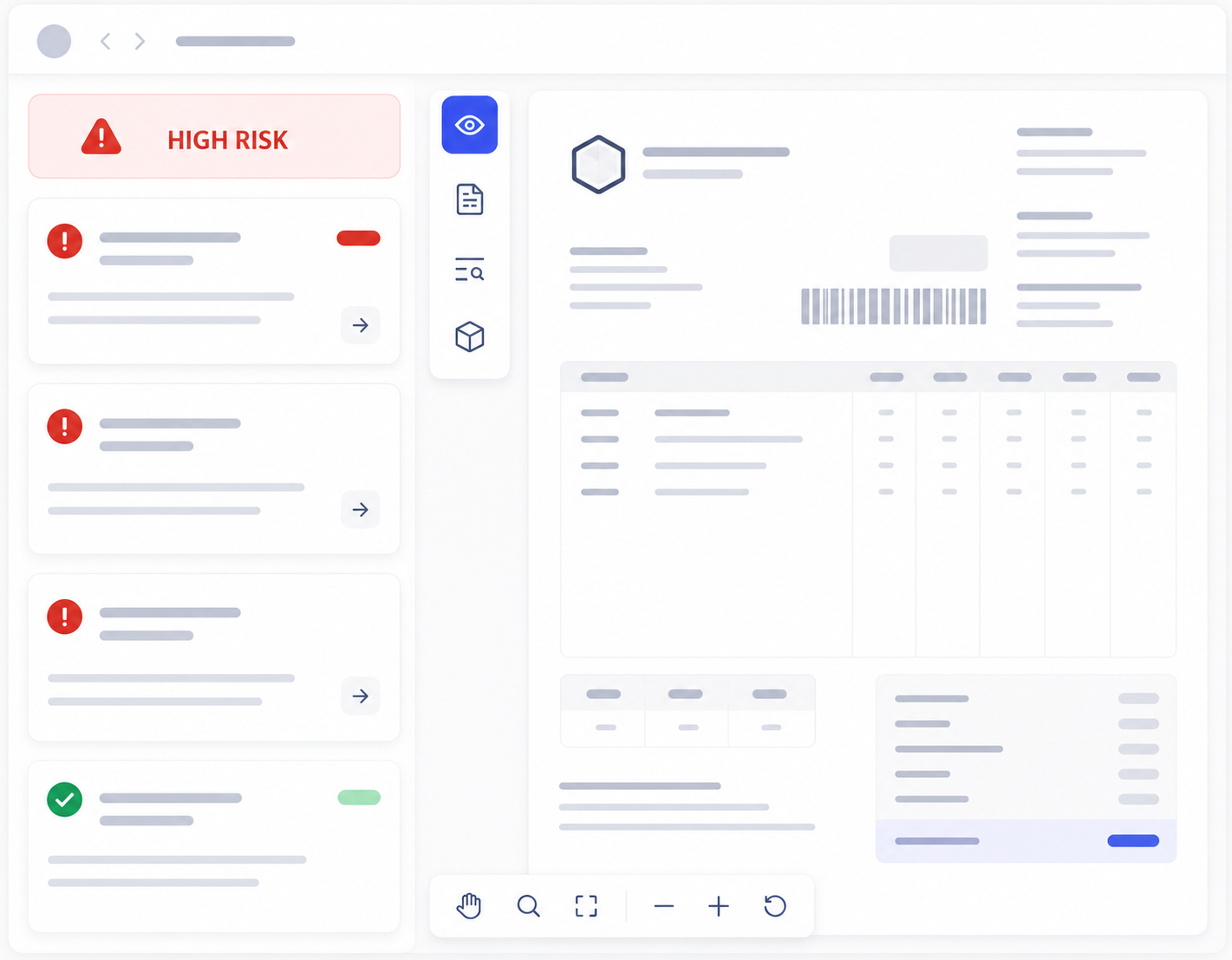
Preview of the Finovox dashboard

Understand the anomalies.
Make your decision.

Examine flagged areas, trace changes to the document and share your conclusions in a report.

Request a demo

From risk level
to a documented decision

Illustrative list of documents and their risk levels.
Example of an altered amount located on a document.
Illustrative history: document creation, modification and saving.
Report bringing together anomalies, history and investigation conclusions.

Examine the clues,
test your hypotheses

An alert alone does not establish fraud. Compare the explanations with the document’s contents to confirm or dismiss your concerns.

Understand
the alert

Read the alert’s explanation to understand what triggered it. You can then identify what to check before drawing a conclusion.

Assess the impact
of alterations

Has an amount or a date changed? When an alteration can be located, examine the affected information to assess its impact on the document.

Trace
the changes

Review the history and the software used to put the changes in context. The use of software alone does not establish fraud.

Make informed decisions
across your use cases

Have doubts about a supporting document? Examine it in depth on the Finovox platform to decide what to do next.

Onboarding & KYC

Resolve doubts
before onboarding

Examine anomalies in a flagged identity document or proof of address. Identify the points that need checking before proceeding with onboarding.

Learn more

Claims

Support your
claims decisions

Examine flagged alterations in an invoice, a quote or a photo submitted with a claim. Share your findings in a PDF report to support your decision or continue the investigation.

Learn more

Financing

Inform your
financing decisions

Examine suspicious amounts and traces of modification in a flagged payslip or bank statement. Share your conclusions with the team reviewing the financing application.

Learn more

Your journey with Finovox

From receiving a document
to making your decision.

From preparing documents to investigating them, discover the role of each product. Your teams remain in control of the decision.

  1. 01 / Prepare

    Document
    Processing

    Automate document splitting, classification and data extraction to feed your tools and checks.

    Learn more
  2. 02 / Validate

    Document
    Validation

    Check documents against your eligibility criteria and business rules by comparing them with your internal and external reference data.

    Learn more
  3. 03 / Detect

    Fraud
    Analysis

    Identify signs of fraud and receive each document’s risk level via API to determine which documents need review.

    Learn more
  4. 04 / Investigate

    Case
    Investigation

    Investigate alerts in depth on the Finovox platform, support your decision and share your conclusions in a PDF report.

What our customers say

“We’re delighted to work with Finovox. Their solution is grounded in strong technological expertise, helping us strengthen our analyses and go beyond gut feeling. We also really value the quality of their client support, driven by a continuous improvement mindset.”
Marine Monneret
“Finovox makes case investigations much easier for the Bouygues Telecom group. Thanks to its real-time response, we can close cases faster, effectively doubling our efficiency. It’s a valuable tool for decision-making during the onboarding process.”"Finovox facilite grandement l’investigation des dossiers pour le groupe Bouygues Telecom. Grâce à sa réponse en temps réel, nous sommes capables de conclure un dossier plus rapidement, ce qui nous permet de doubler notre efficacité. Finovox est une aide précieuse dans la prise de décision lors des souscriptions."
Raliatou Diouf
“PwC France is very pleased with its collaboration with Finovox. The availability and responsiveness of our point of contact have been outstanding, making our work much easier. The tool has proven effective in detecting and reporting document fraud, contributing to the success of our forensic engagements.”
Dorian Prévost
“Finovox plays an active role in detecting fraudulent documents through a range of consistent indicators. It has become an essential part of iCover’s toolkit.”
Antoine Andrieu
“Finovox’s solution automates fraud detection, greatly simplifying the process. It presents verification results clearly, making decision-making easier. It also allows us to cross-check information with external sources like Pappers for deeper verification. Thanks to Finovox, we can anticipate and effectively prevent fraud attempts — a real asset for our industry.”
Karine Demonet
“Thanks to Finovox, we’ve achieved significant time savings. The tool has quickly gained strong traction internally, and we’re now considering rolling it out across all HP teams. When I detect fraud, the document history provided by Finovox helps me trace the document’s origin and, if needed, alert my counterparts in other companies.”
Elodie Foucher
“At MYM, protecting minors is a top priority. This partnership with Finovox enables us to do so in a concrete and reliable way, thanks to a high-performing French technology tailored to our needs. We’re proud to adopt a solution that goes beyond simple age verification.”
Gaspard Hafner
“Given the volume of documents to process, manual review is no longer enough. That’s why we’re pleased to offer our clients a solution like Finovox to support their marketing operations.”
Marjorie Rozey

Let’s discuss your challenges

Investigate your documents.
Make decisions based on concrete findings.

Discover the Case Investigation tools in a demo tailored to your document analysis needs.

  • Examine anomalies and flagged areas
  • Trace changes to the document
  • Review the findings before making your decision
  • Share your conclusions in a PDF report

Trusted by

L’Olivier Assurance HP MetLife SPVIE Assurances

Talk to
our experts

Tell us about the documents you analyse and the points you want to check.

Frequently asked questions

What you need to know about investigating a document with Finovox.

What is Case Investigation?

Case Investigation is the area of the Finovox platform where your teams can examine a flagged document. Review anomalies, traces of modification and the available history to understand the alert, make your decision and share your conclusions.

What is the difference between Fraud Analysis and Case Investigation?

Fraud Analysis analyses documents via API and provides their risk level and associated alerts. Case Investigation lets your teams explore these results in greater depth on the Finovox platform. This takes you from detecting a risk to examining the document concerned.

Which tools help you investigate further?

You have access to explanations of alerts, visualisation of located anomalies, a 3D view and the document’s available history. Information about the software used also provides context to examine modifications and guide your checks.

Can you see where a document has been modified?

When an anomaly can be located, you can see the affected area directly on the document. This lets you examine an amount, a date or another suspicious piece of information. Some alerts concern the document as a whole and do not correspond to a specific area.

Does a high risk level mean that a document is fraudulent?

A high risk level flags a document for priority review. Your teams compare the alerts with the available evidence to confirm or rule out a suspicion, or request additional checks. Case Investigation provides the findings; the decision remains in your hands.

What is the PDF investigation report used for?

The report brings together the investigation findings and your conclusions. You can share it with a colleague or the team continuing the investigation to explain your decision and provide the information they need, without repeating all the checks from scratch.

When should you use Case Investigation?

You can investigate doubts about an identity document during onboarding, examine a flagged invoice before settling a claim or investigate a payslip as part of a financing application. The aim is to understand the document’s anomalies before deciding what to do next.